App guide: Connect Smart Drive

On this page you'll find all the help you need to fully understand the Connect Smart Drive application. Need more help? Please contact us using the button below!

Contact us

Reservation type

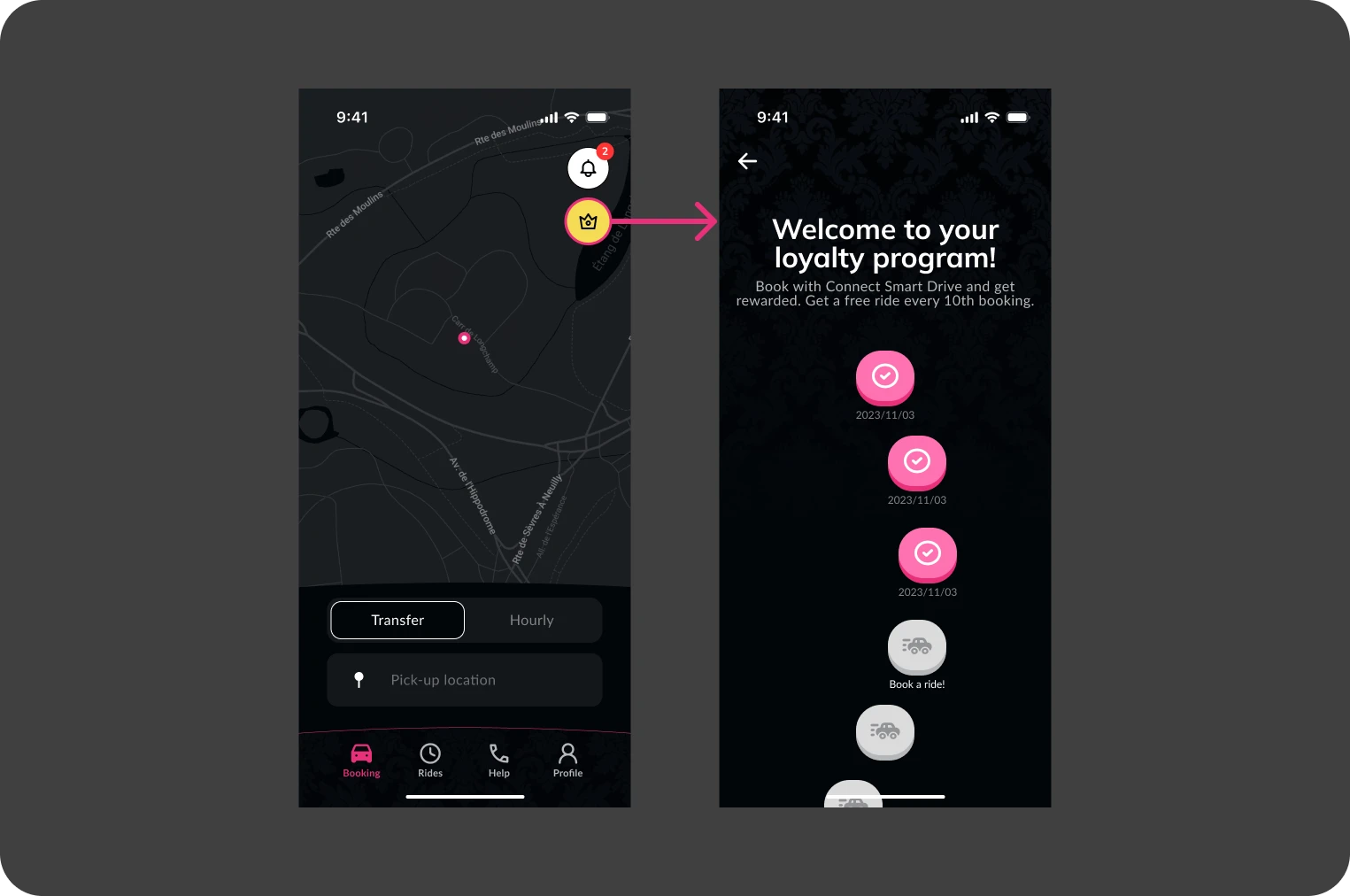
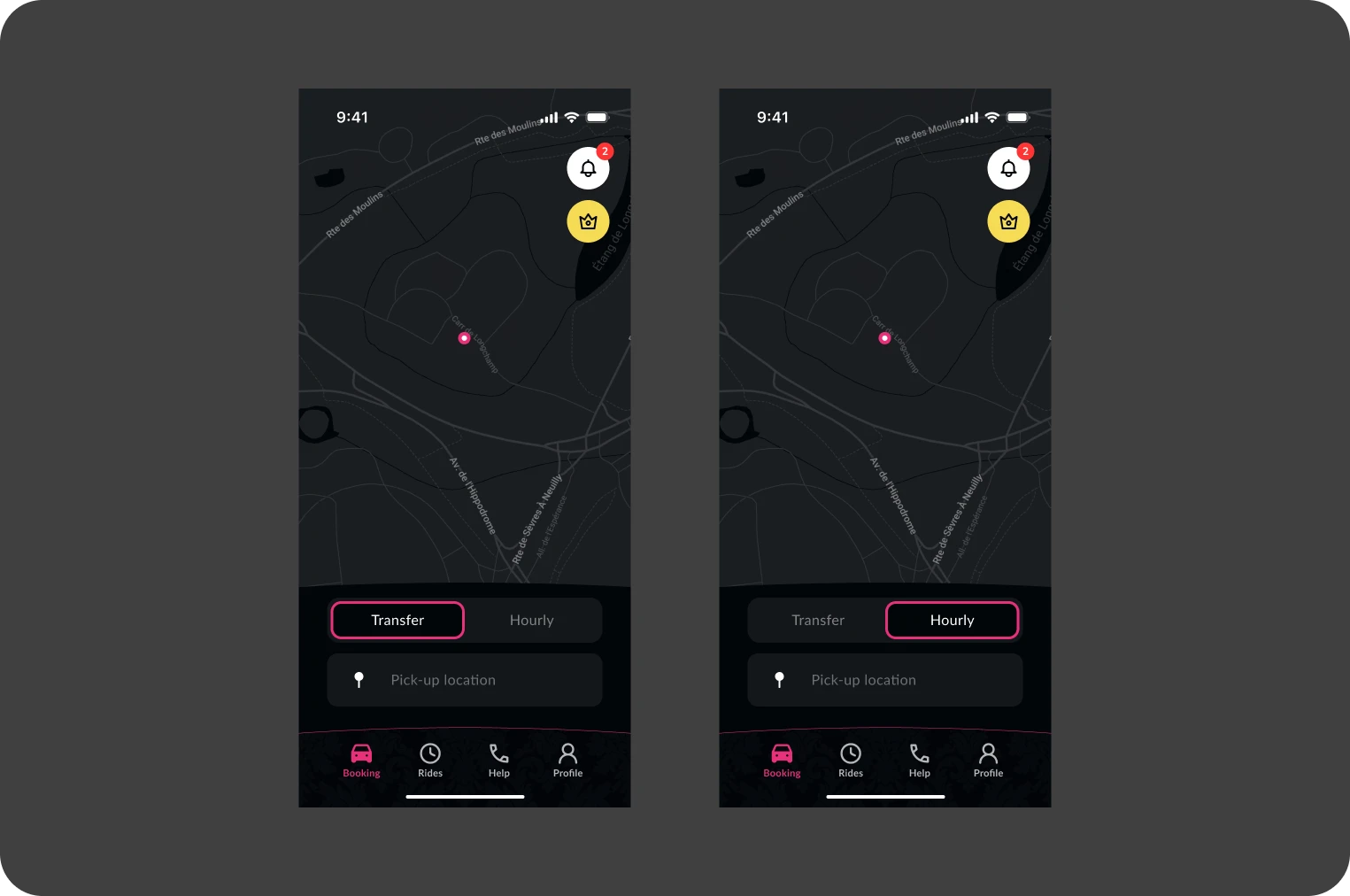
The app's main screen lets you choose between different types of reservation as soon as it opens. Options include transfer for a direct journey from one point to another, and hourly booking which is ideal for routes with more flexible needs or multiple stops. To start the booking process, select the desired type and press the "Pick-up address" button. Enter your departure address and let us guide you through the booking process. Additional icons on this screen provide access to notifications (bell icon) and the loyalty program (crown icon), enriching the user experience.

  • Reservation type : Transfer or hourly
  • Additional features Access to notifications and loyalty program.
Route selection

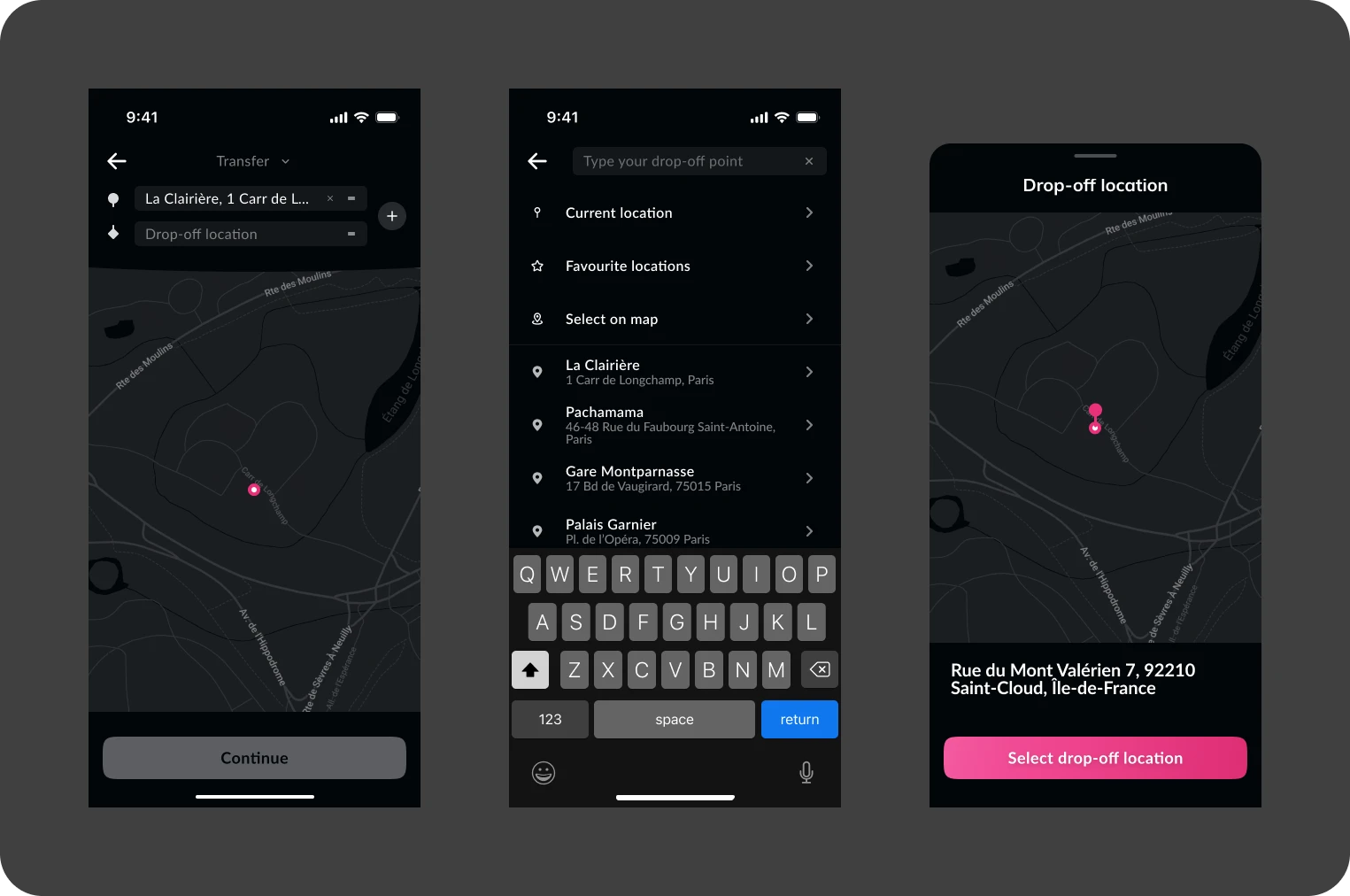
There are several practical options for selecting your departure and arrival addresses. On the address selection screen, you can manually enter an address in the search bar, which will trigger automatic suggestions. You can also use your current GPS location to quickly define your starting point. For a more personalized experience, you can access your saved or favorite addresses, facilitating recurring bookings. What's more, you can select an address directly on the map, where the central pin indicates your chosen location and the address adjusts itself according to your position on the map. If your route requires several stops, you can easily add additional stages by selecting the "Add a stop" option for each desired stop on your route.

  • Manual entry Automatic suggestions as you type.
  • GPS location Sets your current address quickly.
  • Favorite addresses Quick access to your frequently used locations.
  • Map selection Direct interaction for a precise choice.
  • Add stops Customize your route with multiple stops.

Remember to save your addresses directly from the trip selection or in your profile for a smoother user experience on future trips!

Schedule selection

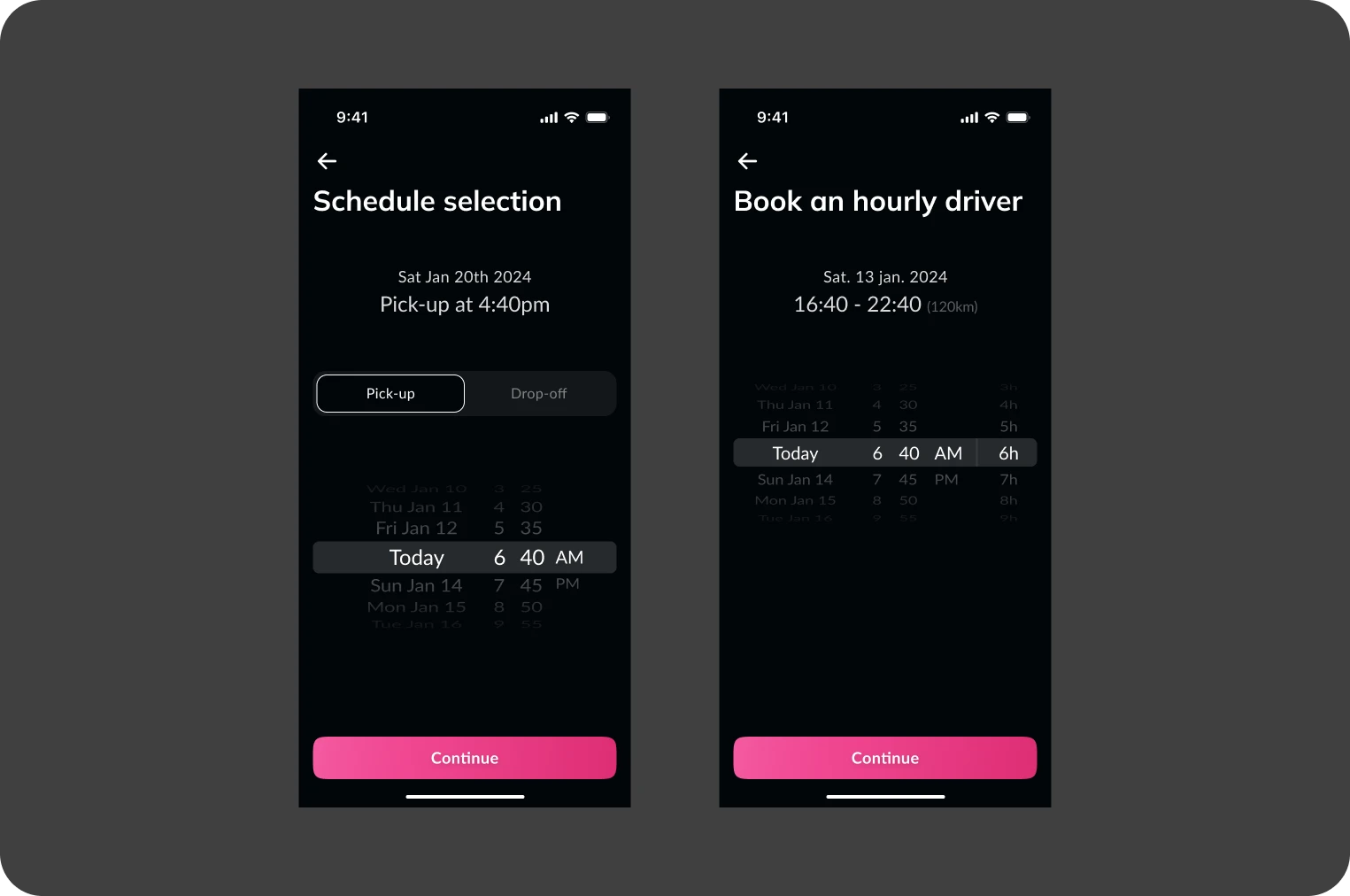
For the schedule selection, you have the flexibility to choose either the departure time or the drop-off time according to your preferences. When booking, you can specify the time you would like to be picked up or the time you would like to arrive at your destination. The application will automatically adjust the drop-off or pick-up time according to your choice, to ensure accurate planning of your journey. This function is particularly useful for planning appointments or commitments without stress.

  • Departure time Select the time you wish to start your journey.
  • Arrival time Indicate the time you need to arrive at your destination.
  • Automatic display The application calculates and displays the remaining arrival or departure time for optimal planning.

This method gives you complete control over your schedule and allows you to customize your trips to suit your needs.

So that our specialized drivers can get to your departure address, reservations must be made at least 2 hours before departure time. Remember to book in advance.

Choice of vehicle

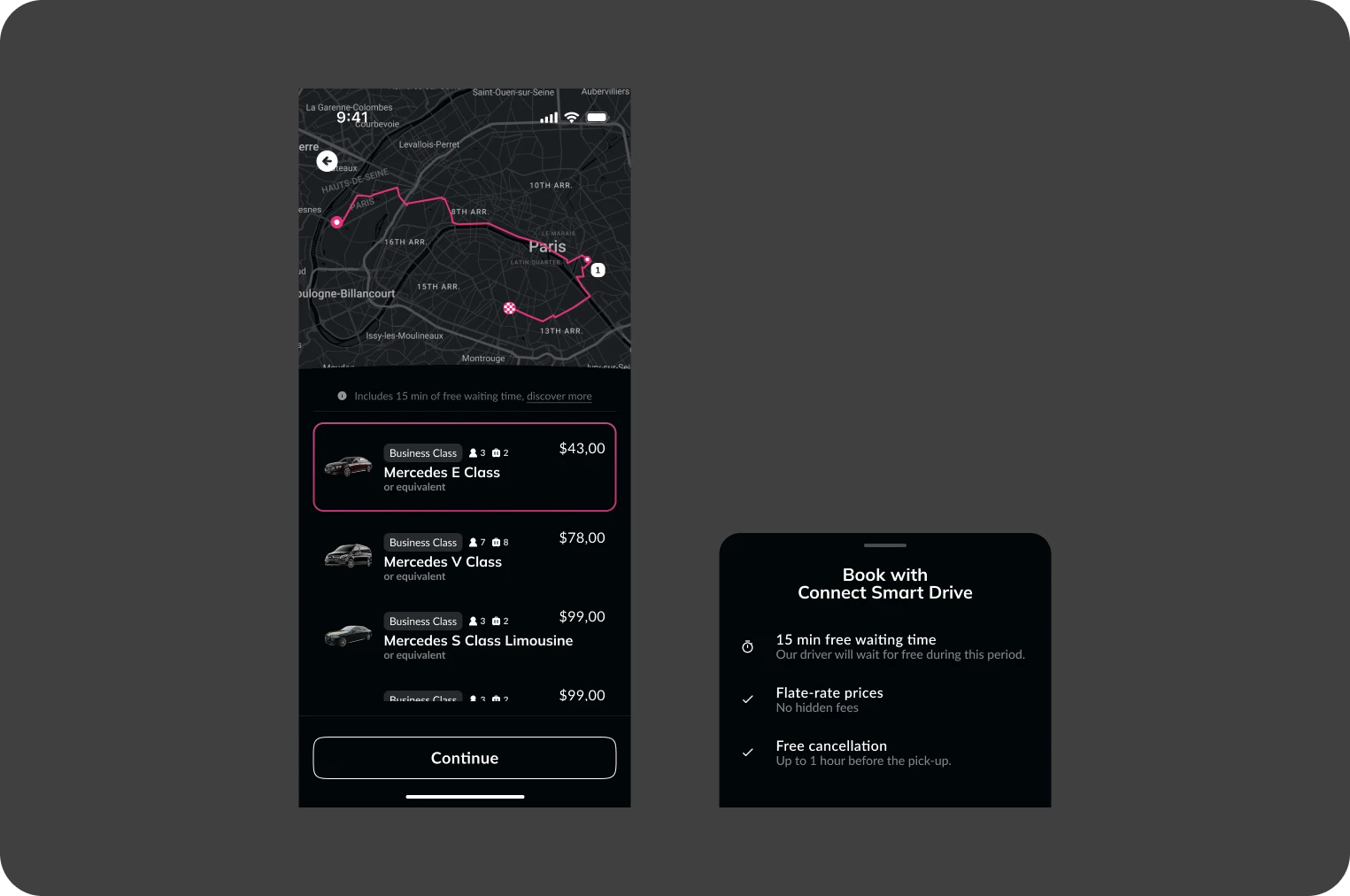
When selecting your vehicle, you can choose from a variety of options tailored to your specific needs, whether for comfort, capacity or style. Each vehicle displayed in the application includes detailed information such as price, maximum passenger and luggage capacity, and vehicle range.

  • Choice of vehicle Various options to meet different needs.
  • Details included Information on prices, passenger and baggage capacities.

Get 15 minutes free for city pickups and 60 minutes for airports. This allows you to manage your travel with greater flexibility, especially in the event of unforeseen delays.

This feature aims to provide a hassle-free travel experience, giving you the peace of mind that your vehicle will be waiting for you even in the event of minor mishaps.

Further information

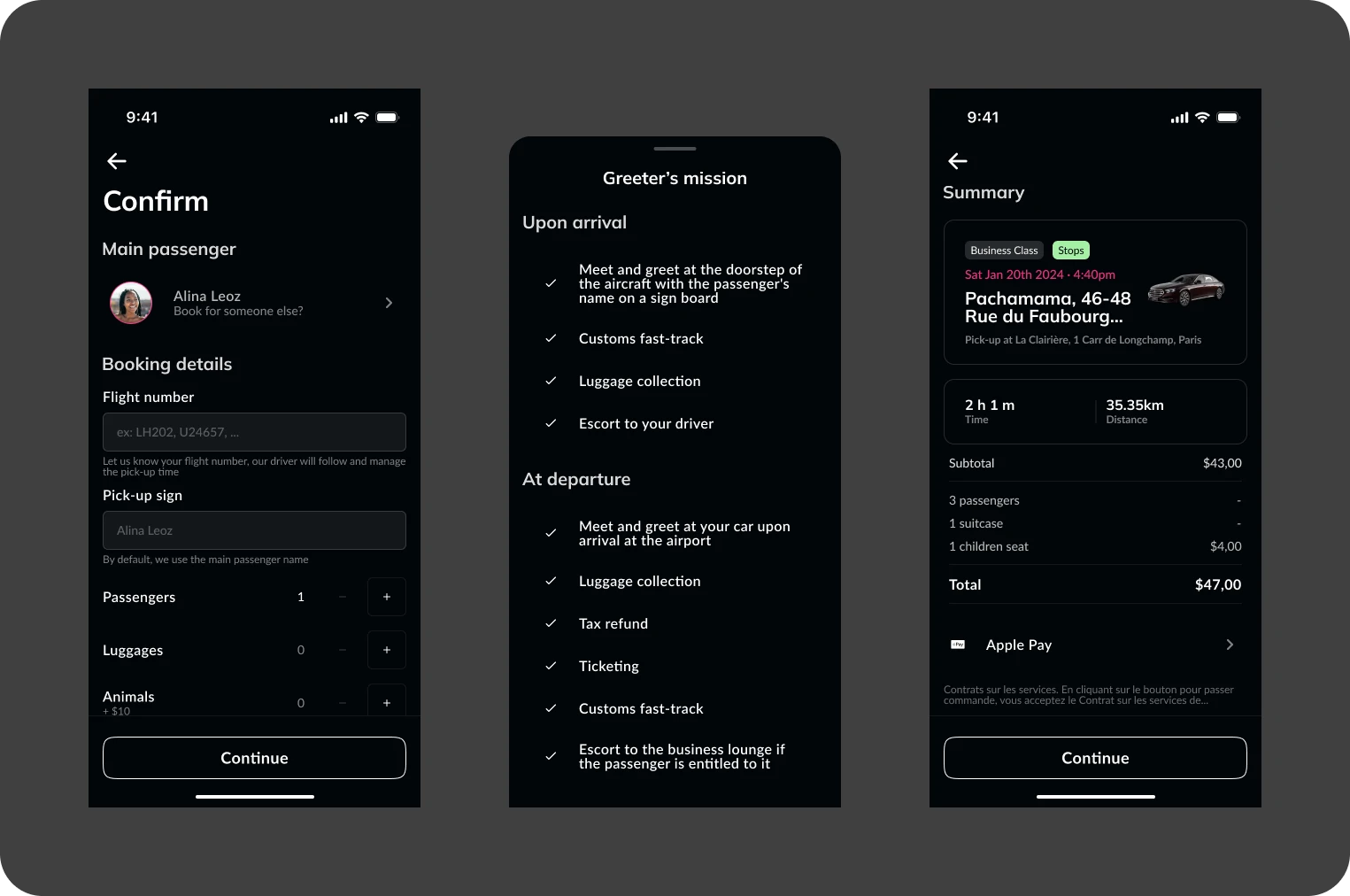
On the booking information screen, you can quickly and intuitively customize every detail of your trip:

  • Passenger change Select a different person in your contacts to receive all SMS messages and sharing links relating to the race.
  • Further information Please indicate your flight number and pick-up sign to make it easier to meet your driver.
  • Greeter : This service, available at the airport for both arrivals and departures, allows you to benefit from the assistance of a greeter. The greeter takes over from you to carry out all the necessary fast-track procedures, ensuring a smooth, stress-free experience, whether checking in your luggage or going through security.
  • Seats for children and babies Add child or baby seats if you're traveling with young children.
  • Pets and luggage Please specify if you are traveling with pets or a large number of suitcases, so that appropriate arrangements can be made.
  • Payment methods Choose your preferred payment method to pay for the race.

These functions are directly accessible so that you can complete or modify your booking as required.

Ride validation

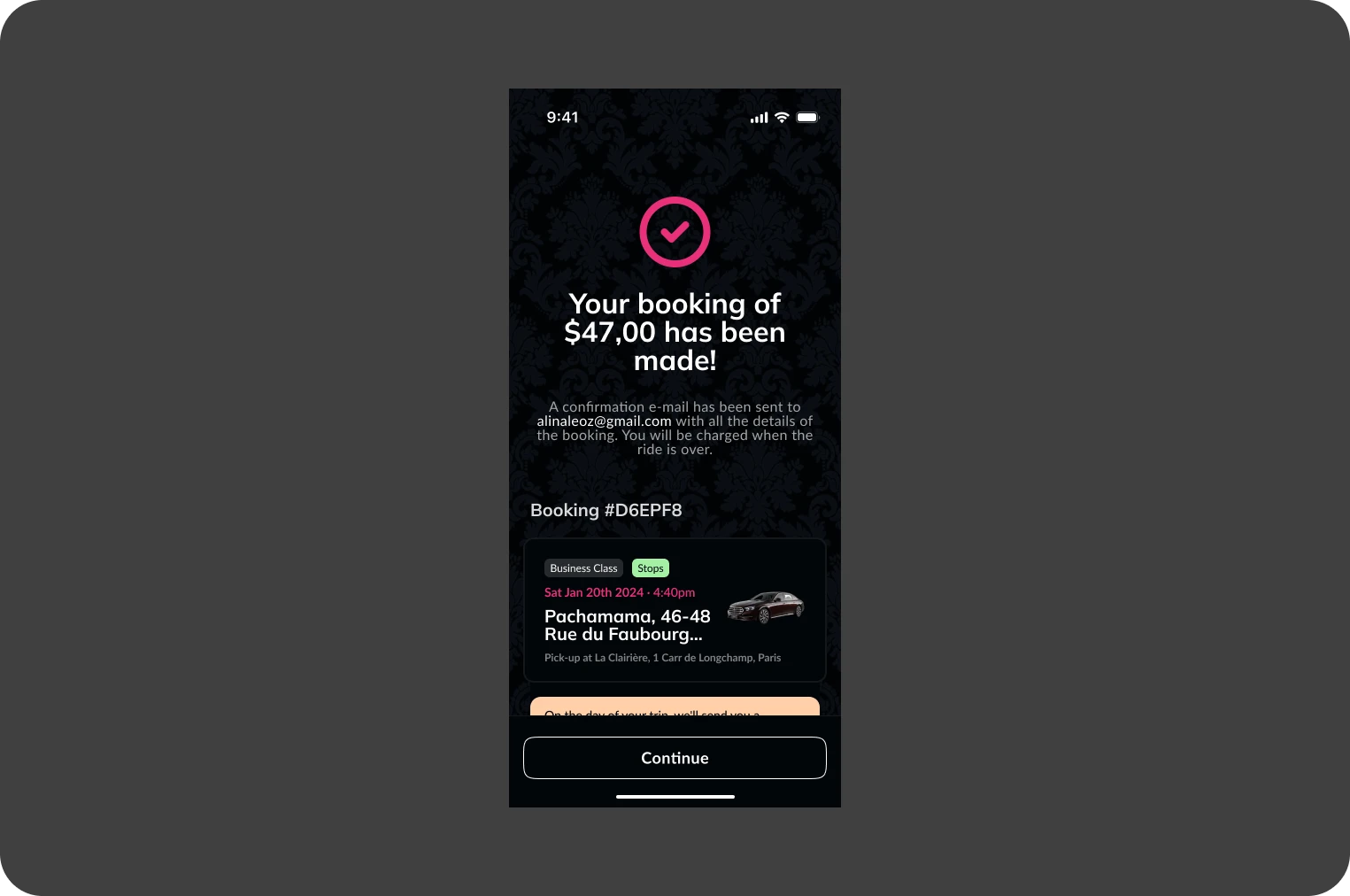
The trip validation screen provides a clear, concise summary of all the relevant information about your trip. You'll see details such as departure and arrival addresses, estimated departure time, vehicle type selected, and any additional options you may have chosen.

  • Add to calendar You can add this itinerary directly to your personal calendar to make sure you don't forget your commitment.
  • Link sharing A tracking link can be shared with your friends or colleagues so that they can follow your journey in real time on the web version of the application.

The purpose of this screen is to offer you a final check before finalizing the booking, allowing you to ensure that all information is correct and complete for a trouble-free journey.

You will receive all your booking information by e-mail. You can also change your booking at any time, even during the journey.


Tracking and modifying the ride

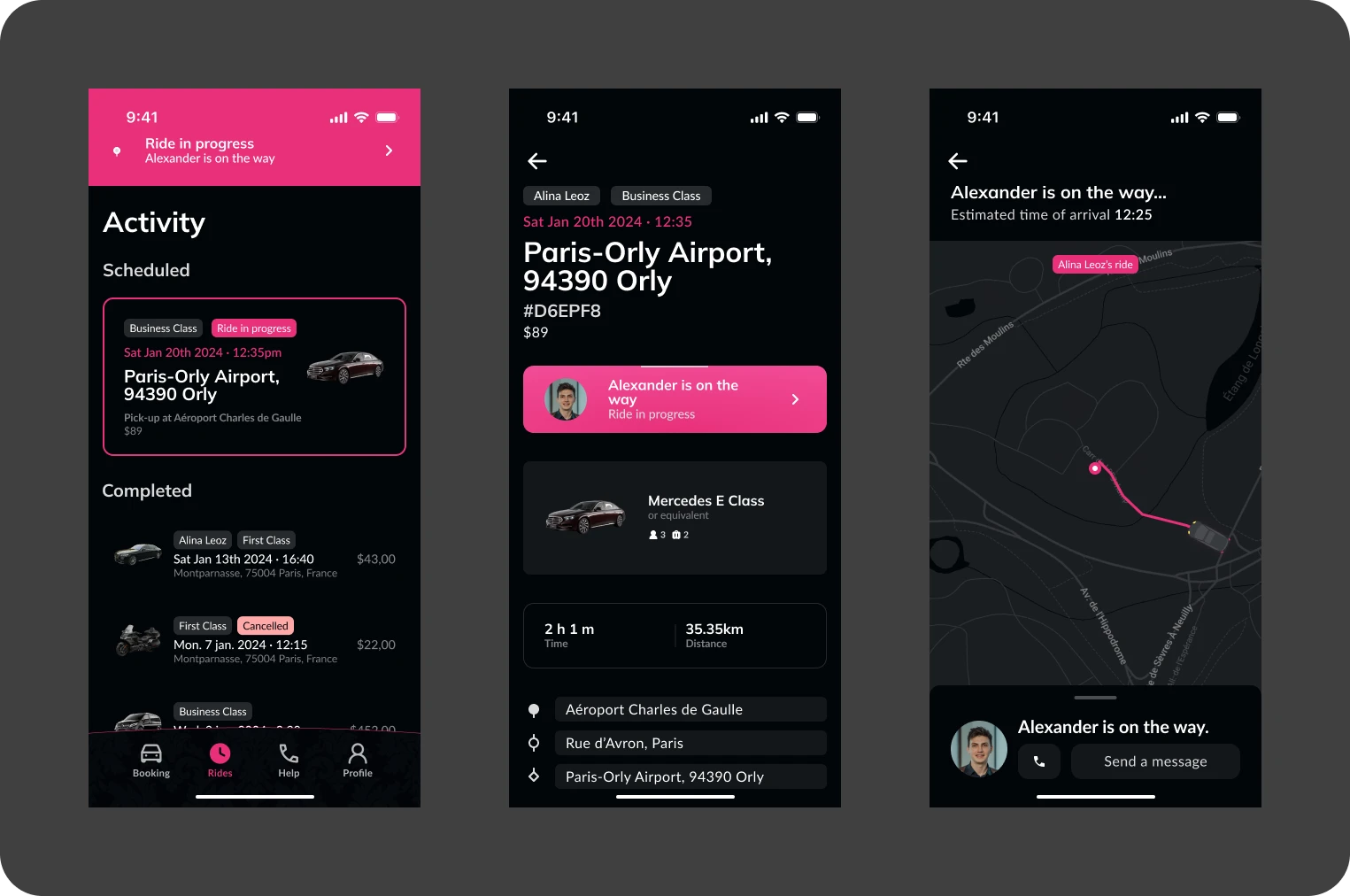
Trip tracking and modification are seamlessly integrated into the application, keeping you informed in real time about the progress of your trip. The trip officially starts 2 hours before the driver's scheduled arrival time, giving you an overview of the preparation and approach of your transport.

  • Real-time tracking From the application, you can observe the driver's progress towards the pick-up location. This function can be accessed at any time from the app's main interface or via the system notifications you receive.
  • Notifications Automatic alerts inform you of the driver's approach, any change in the status of the trip and other relevant events.
  • Editing the ride If necessary, you can modify the details of the trip or cancel it directly from the application, giving you flexibility and total control over your trip planning.

These features are designed to ensure a smooth and reassuring user experience, keeping you constantly informed and enabling you to react quickly to any changes.

Ride rating

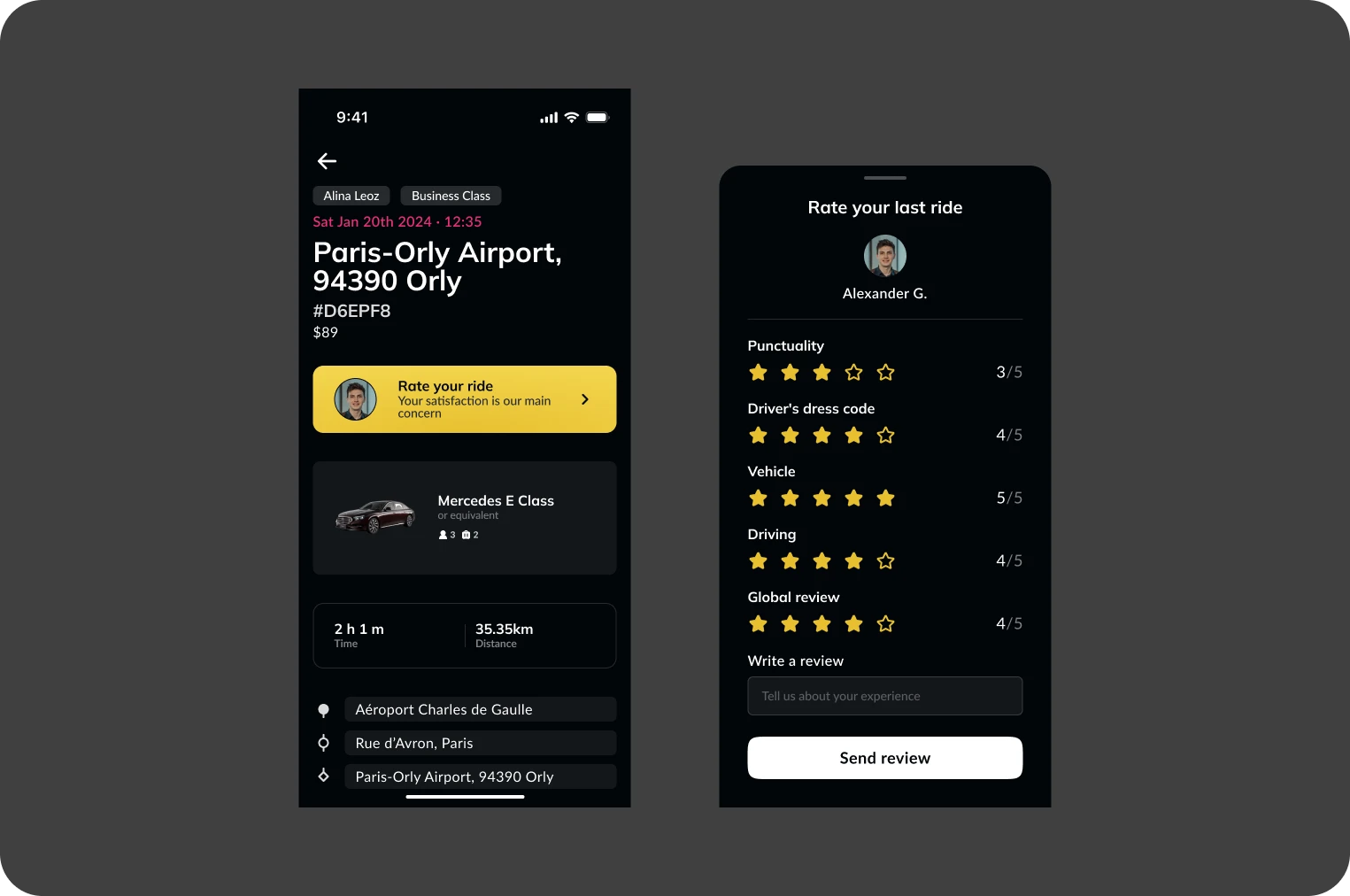
After each race, you can give your opinion to help improve the service. You can rate the race overall, as well as on four specific criteria:

  • Punctuality Note your driver's punctuality in arriving at the pick-up location on time.
  • Dress Code Evaluate the driver's appearance and dress, which must be in line with the service's professional standards.
  • Vehicle Give your opinion on the cleanliness, comfort and general condition of the vehicle used for the race.
  • Driving Rate the driver's conduct in terms of safety, courtesy and efficiency.
  • Global A general assessment of the overall race experience.

These evaluations are important because they help guarantee service quality and provide constructive feedback to drivers for ongoing improvements.

Loyalty program

To reward your loyalty, we've designed a special benefit: your tenth run is free, up to a limit of 30 km.
If your journey exceeds these limits, don't worry! The difference will be converted into a discount applicable directly to the total cost of the journey. So, whatever the distance or duration, you always get the full benefit of your reward.

  • Free ride Enjoy your tenth free run up to 30 km.
  • Attractive discount : Benefit from a discount if your race exceeds the set limits.

This loyalty scheme is reserved for our individual members.

Invoice archive

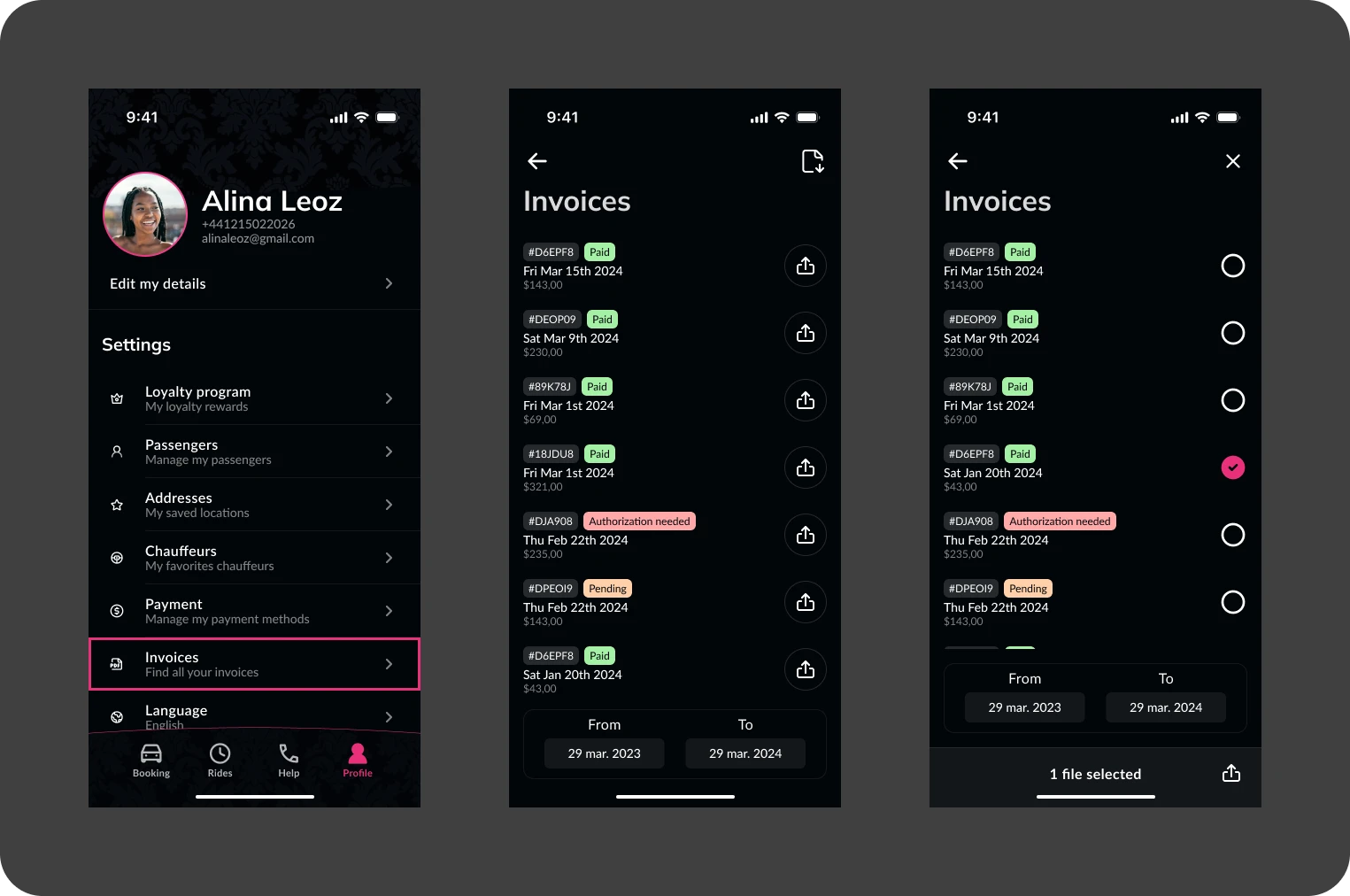
Managing your invoices is simplified in the application thanks to an efficient selection and download system. You can easily access all your invoices and manage them intuitively.

  • Bundled download Select several invoices at once to download them in a single batch, saving you time and keeping an organized record of your expenses.
  • Date filters Use date filters to quickly find invoices for a specific period. Whether you're looking for invoices from last month or last year, the filtering tool helps you find exactly what you need without having to manually go through your documents.
  • Easy access All your invoices are stored in a secure location on the application, accessible at any time for viewing or downloading.

These features are designed to make managing your invoices as easy and convenient as possible, allowing you to keep your transportation expenses organized and effortless.

Claims following an incident

In the event of an incident during your race, the app offers you a direct and efficient means of making a claim, allowing you to quickly communicate any problems you encounter.

  • Hotline A hotline is available directly from the application. You can call us at any time, and we'll be there to help you.
  • Claim follow-up After submitting your complaint, we will contact you by e-mail or telephone, depending on the urgency of the situation.

This system is designed to ensure that all your concerns are dealt with efficiently and that you receive the necessary assistance quickly, guaranteeing a satisfactory user experience even in the event of incidents. If you can't reach us, you can also contact us via the website, by clicking here.

Directly from your phone

Use our mobile app to book a driver in just a few clicks. Track your transfers in real time, receive notifications and make sure your journeys run smoothly. Our advanced technology simplifies your reservations and gives you peace of mind before, during and after your journey.

Book a Private Driver with Connect Smart Drive